Python Automation for Data Workflows

Python's readability and rich standard library make it the natural lingua franca for automation across engineering, analytics, and operations teams.
A practical Python automation architecture pairs lightweight orchestration with robust data engineering primitives: use pandas for vectorized transformations and reporting, pathlib for cross‑platform file handling, and targeted tools like Selenium when you must extract dynamic web content. These building blocks let teams prototype quickly and then harden the same code for production by adding idempotency, retries, and schema checks.
Designing a framework is less about picking a single library and more about composing patterns that scale. Modular task functions, clear separation between orchestration and execution, and observable failure modes turn brittle scripts into maintainable services.
Lightweight orchestration (cron, APScheduler, or task libraries) should manage scheduling, dependency graphs, and retries while the pipeline code focuses on ingestion, vectorized transformation, and deterministic outputs. Embedding logging, metrics, and alerting from day one reduces firefighting and enables safe, incremental automation growth.
When web extraction is required, Selenium remains a pragmatic choice for dynamic pages, but it should be used judiciously inside resilient ingestion pipelines: isolate scraping logic, cache raw snapshots, and validate schemas before downstream processing.
For reporting and distribution, automated Excel and PDF generation driven by pandas and reporting libraries can be scheduled and distributed via secure channels, completing the loop from ingestion to stakeholder delivery. These patterns - ingest, transform, orchestrate, observe - form a repeatable framework that teams can adapt to daily workflows, complex data pipelines, and enterprise task orchestration.
I. The Paradigm of Python-Based Automation and Workflow Engineering.
The modern operational environment across all data-centric domains demands absolute precision, unparalleled execution speed, and the elimination of human error.
Organizations are continuously burdened by administrative and analytical tasks that follow highly stereotyped, predictable sequences: the retrieval of remote data, the transformation of raw inputs into standardized formats, the generation of consumable analytical reports, and the dissemination of these artifacts to relevant stakeholders.
The execution of these repetitive sequences through manual human intervention introduces significant operational friction, limits organizational scalability, and introduces an unacceptable margin for error. Consequently, the transition toward fully automated, algorithmic pipelines has become a systemic requirement rather than an optional optimization.
Python has emerged as the definitive standard for architecting these automation workflows. Its dominance is underpinned by a clean, highly expressive syntax that reduces the learning curve for non-traditional developers, combined with an unparalleled ecosystem of specialized, high-performance libraries capable of executing complex computations.
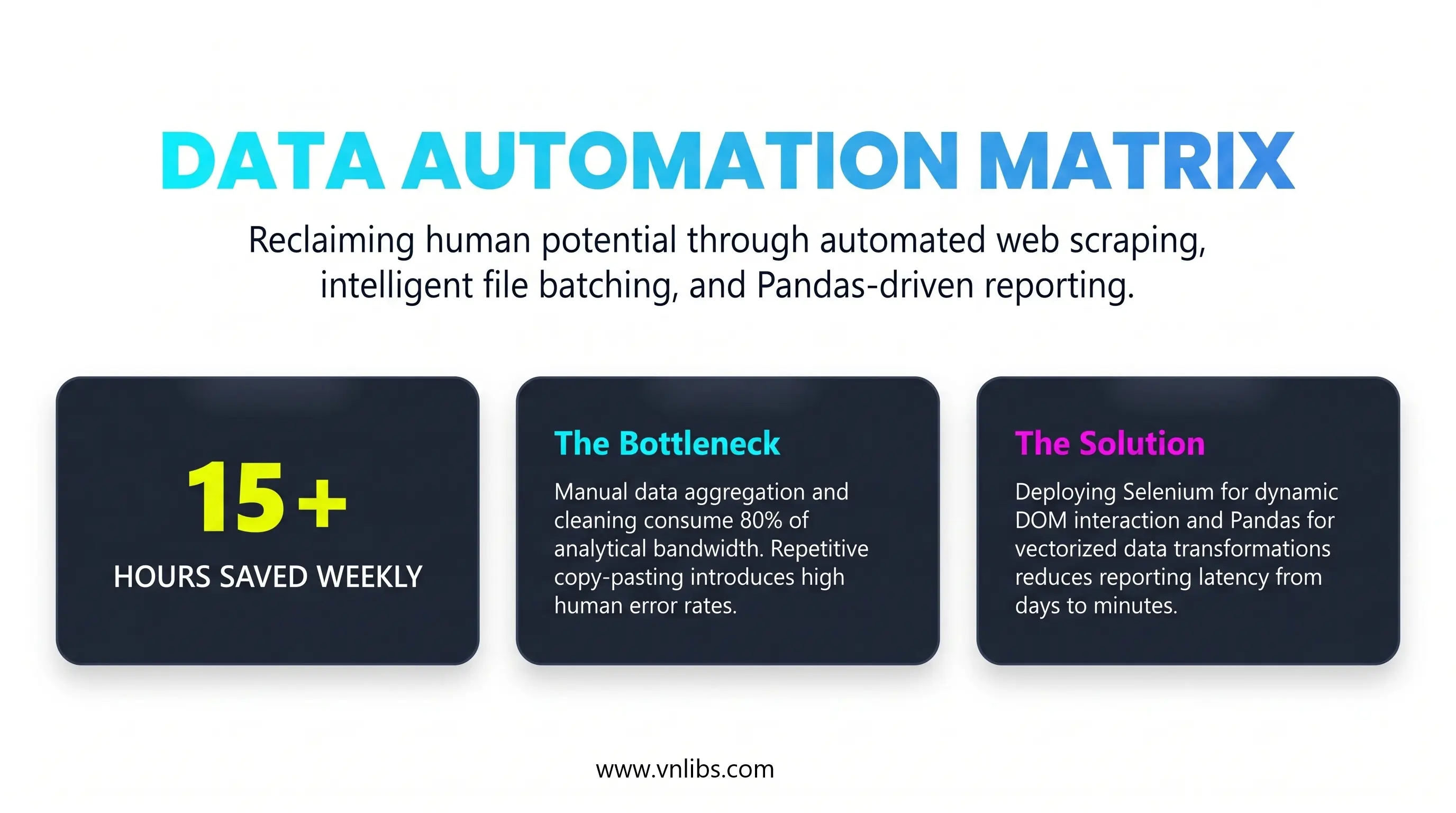
Python's low barrier to entry facilitates rapid development and simplified debugging, while its underlying architectural flexibility allows for the seamless scaling of scripts into advanced enterprise workflows, cloud integrations, and microservices.
The transition from executing isolated scripts to deploying fully autonomous data pipelines requires a deep understanding of several critical operational layers.
True end-to-end automation seamlessly connects disparate modules: web extraction frameworks that simulate human browser interactions, highly vectorized memory manipulation engines that sanitize and aggregate millions of records in milliseconds, serialization modules that programmatically design visual reports, and asynchronous scheduling daemons that ensure continuous execution.
The Developer Ecosystem and Automation Communities
The rapid advancement of Python automation is heavily reliant on the open-source community, where engineers continuously share, optimize, and document robust automation snippets for daily tasks.
Building a reliable pipeline rarely requires engineering every component from scratch; rather, it involves leveraging the collective intelligence of global developer forums and curated code repositories.
The primary hub for troubleshooting automation logic, particularly for nuanced issues involving web scraping or data structures, remains Stack Overflow, which utilizes a reputation-based gamification system and tag-based filters to surface optimal solutions. However, the ecosystem has expanded significantly beyond transactional Q&A platforms.
GitHub Discussions now serve as highly integrated collaborative spaces where developers brainstorm architectural implementations directly alongside the codebase. Furthermore, community-driven platforms such as Dev.to and specialized subreddits (including r/Python and r/learnpython) provide continuous streams of tutorials, industry trends, and architectural best practices.
Within these communities, engineers have cultivated massive, curated repositories of "ready-to-use" automation scripts. Repositories such as Daily.py, Awesome-Python-Scripts, and amazing-python-scripts provide modular, highly customizable templates for tasks ranging from file handling to network monitoring.
Utilizing these resources allows data scientists and system administrators to rapidly deploy battle-tested logic, ensuring that their pipelines are built upon structurally sound foundations.
II. Intelligent File System Operations and Batch Processing.
At the foundational base of any automated pipeline is the requirement to interface with the host machine's file system. Automation engines must continuously monitor input directories, ingest source files, organize output artifacts, and archive historical logs. Historically, developers managed file pathways using standard string concatenation and procedural functions provided by the os and shutil modules.
However, treating file paths as simple text strings introduces significant architectural fragility. Different operating systems utilize conflicting path separators - Windows environments rely on backslashes (\), whereas POSIX-compliant systems utilize forward slashes (/). Manual string concatenation frequently results in localized execution failures when scripts are migrated across different environments.
The modern architectural standard mandates the use of pathlib, which replaces string-based pathing with robust, cross-platform object-oriented representations. By converting a path into a class object, developers gain immediate access to inherent properties without relying on complex, error-prone string splitting algorithms.
For example, invoking .name returns the full filename, .suffix isolates the file extension, .stem returns the filename without the extension, and .parent returns the directory tree holding the file.
In a production data‑ingestion pipeline used by a global analytics team, pathlib.Path is the canonical interface between the orchestration layer and the file system: an orchestrator (Airflow, Dagster, or a lightweight scheduler) hands a Path object to each task so the same code runs unchanged on developer laptops, Linux workers, and Windows build agents.
The pipeline’s ingestion task uses Path.glob('**/*.csv') to discover new files, then atomically moves each file into a staging directory with path.replace() to guarantee no partial reads; a downstream validation step opens the file with path.open() and asserts schema and row counts before path.rename() moves validated files to a processed folder and writes a timestamped archive to an immutable archive directory.
Tests in CI instantiate Path objects against temporary directories (via tmp_path fixtures) to assert that .suffix, .stem, and .parent behave identically across platforms, and the pipeline’s health checks verify that file permissions, existence, and modification times are consistent before any transformation runs.
This pattern reduces migration failures, enables deterministic retries, and makes forensic debugging straightforward because file metadata and transitions are explicit and type‑safe.
Code example with the pathlib production pattern:
from pathlib import Path
import shutil
import hashlib
import time
import csv

def file_checksum(path: Path, chunk_size: int = 8192) -> str:
    h = hashlib.sha256()
    with path.open("rb") as f:
        for chunk in iter(lambda: f.read(chunk_size), b""):
            h.update(chunk)
    return h.hexdigest()

def validate_csv_schema(path: Path, expected_columns: list[str]) -> bool:
    with path.open("r", newline="") as fh:
        reader = csv.reader(fh)
        header = next(reader, [])
        return header[:len(expected_columns)] == expected_columns

def ingest_files(base_dir: Path, expected_columns: list[str]) -> None:
    base_dir = base_dir.resolve()
    staging = base_dir / "staging"
    processed = base_dir / "processed"
    archive = base_dir / "archive"
    staging.mkdir(parents=True, exist_ok=True)
    processed.mkdir(parents=True, exist_ok=True)
    archive.mkdir(parents=True, exist_ok=True)

    # Discover CSVs recursively and atomically move them into staging
    for src in base_dir.glob("**/*.csv"):
        # Skip files already in our managed folders
        if staging in src.parents or processed in src.parents or archive in src.parents:
            continue

        staged_path = staging / src.name
        # Atomic move to staging to avoid partial reads
        src.replace(staged_path)

        # Basic validation before processing
        if not validate_csv_schema(staged_path, expected_columns):
            # Move invalid files to archive with a failure tag
            failed_name = f"{staged_path.stem}_INVALID_{int(time.time())}{staged_path.suffix}"
            staged_path.replace(archive / failed_name)
            continue

        # Compute checksum for audit and archive
        checksum = file_checksum(staged_path)
        timestamped_archive = archive / f"{staged_path.stem}_{int(time.time())}{staged_path.suffix}"
        shutil.copy2(staged_path, timestamped_archive)

        # Finalize: move to processed (atomic)
        final_path = processed / staged_path.name
        staged_path.replace(final_path)

        # Write a simple audit file alongside processed file
        audit = final_path.with_suffix(final_path.suffix + ".audit")
        audit.write_text(f"processed_at={int(time.time())}\nchecksum={checksum}\n")

# Example: how CI tests can exercise the same Path behavior using pytest tmp_path
def test_ingest_roundtrip(tmp_path: Path):
    # Arrange: create directories and a sample CSV
    src_dir = tmp_path / "incoming"
    src_dir.mkdir()
    sample = src_dir / "sample.csv"
    sample.write_text("id,name\n1,Alice\n2,Bob\n")

    # Act: run ingestion
    ingest_files(tmp_path, expected_columns=["id", "name"])

    # Assert: processed file exists and audit file recorded
    processed = tmp_path / "processed" / "sample.csv"
    assert processed.exists()
    audit = processed.with_suffix(processed.suffix + ".audit")
    assert audit.exists()
    assert "checksum=" in audit.read_text()
The snippet demonstrates a production-ready pattern for reliable, cross‑platform file ingestion and processing using pathlib - discovering files, performing atomic moves into staging, validating content, archiving with checksums, and recording auditable metadata - plus a CI test that verifies the same behavior across environments.
- Cross‑platform path safety: It uses Path objects instead of string concatenation so path operations behave consistently on Windows, macOS, and Linux.
- Atomic transitions to avoid partial reads: Files are moved into a staging area with replace() to ensure downstream tasks never see partially written files.
- Validation before processing: A schema check (validate_csv_schema) prevents invalid inputs from contaminating downstream data.
- Auditable archival: The code computes a checksum, copies a timestamped archive, and writes a small .audit file so each processed file has verifiable provenance.
- Deterministic finalization: Valid files are atomically moved to processed, making retries and failure recovery straightforward.
- Testability in CI: The tmp_path test shows how the same Path semantics are exercised in automated tests to catch OS differences early.
The example's main message is that treating filesystem interactions as typed, atomic, and testable operations - rather than ad‑hoc string manipulations - dramatically reduces brittle failures, improves observability, and makes ingestion pipelines safe to run at scale.
II.1. Designing Collision-Resistant Archival and Sorting Algorithms.
A prevalent use case for Python automation involves the batch processing and sorting of unorganized directories - such as mapping downloaded files into specific subdirectories based on their file extensions (e.g., routing .pdf files to a "PDF" folder, or .csv files to a "CSV" folder).
When executing these batch modifications, scripts that blindly iterate through a directory using os.listdir() and execute os.rename() are highly susceptible to destructive race conditions. If the automation engine attempts to move a file into a destination directory where a file with an identical name already exists, the operating system will typically overwrite the existing file, resulting in catastrophic data loss.
Production-grade file automation demands the implementation of algorithmic collision handling. When organizing files, the system must pre-validate the destination path. The optimal architectural pattern involves a recursive or iterative function that inspects the target directory. If a collision is detected (e.g., financial_report.csv already exists), the script extracts the file's stem and suffix using pathlib, and initiates a while loop.
This loop appends an incrementing integer to the stem - generating financial_report (1).csv, financial_report (2).csv - and continuously checks the destination until a mathematically unique pathway is verified. Only after this unique path is confirmed does the script execute the file transfer.
Furthermore, robust file manipulation pipelines must incorporate "Dry-Run" execution states. Before the script is permitted to alter the host machine's file structure, it must simulate the entire algorithmic sequence, outputting the proposed source-to-destination mappings to the standard output console or a specialized log file.
This fundamental guardrail separates fragile administrative scripts from reliable, enterprise-grade tooling. When the pipeline is executed in a live state, the automation must generate an immutable audit trail - a text document containing a timestamped manifest of every single byte stream successfully relocated - which serves as a critical artifact for system recovery and debugging.
II.2. Streamlined Directory Iteration and Byte Stream Migration.
For batch manipulation tasks, such as appending standardized ISO-8601 datestamps to thousands of legacy operational logs, pathlib streamlines the asset discovery phase.
Engineers can utilize the .glob() method for highly efficient flat directory pattern matching (e.g., isolating only .csv files) or .rglob() to recursively traverse deeply nested subdirectory trees.
Once the target assets are isolated, the script constructs the new nomenclature and utilizes the .with_name() method, which safely replaces the file's terminal name while perfectly preserving the complex object-oriented pathing structure of the parent directories.
While pathlib handles the logical representation and fundamental renaming of paths, the physical duplication or relocation of data across isolated network drives or distinct storage volumes relies on the shutil module.
Methods such as shutil.copy() and shutil.move() are architecturally critical because they safely manage the underlying byte stream transfers while preserving critical metadata, such as creation dates and permission matrices.
The strategic integration of pathlib for object mapping and shutil for physical data transfer allows Python to transform any host machine into an extraordinarily fast, error-free automated file clerk.
III. Dynamic Web Extraction and DOM Interaction Engineering.
The data ingestion phase of an automated pipeline frequently necessitates the extraction of intelligence from external web environments. Historically, data extraction was achieved by dispatching simple HTTP requests and parsing the static HTML responses utilizing libraries such as BeautifulSoup.
However, modern web architecture relies heavily on asynchronous JavaScript and XML (AJAX) to render Document Object Models (DOMs) dynamically on the client side. Consequently, the desired data is almost never present in the initial server response payload; it is only generated after the browser executes the embedded JavaScript.
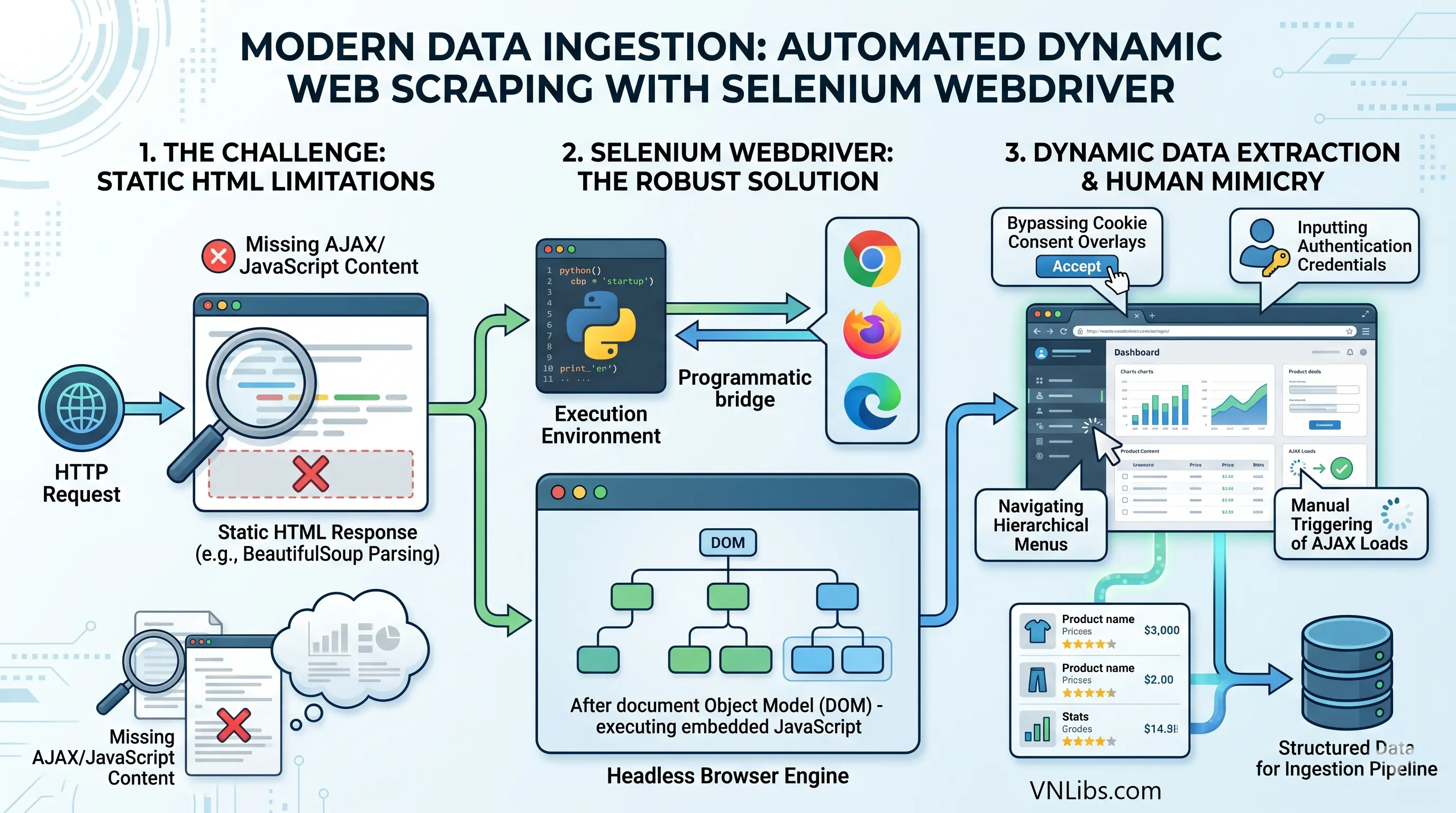
To circumvent this critical limitation, automation pipelines must deploy headless browsers capable of rendering complex DOMs, making Selenium WebDriver the definitive framework for robust web scraping architectures.
Selenium establishes a native, programmatic communication bridge between the Python execution environment and the host browser rendering engine (such as Google Chrome, Mozilla Firefox, or Microsoft Edge).
This architecture allows the script to perfectly mimic human interactions: navigating complex hierarchical menus, inputting text into authentication forms, bypassing cookie consent overlays, and manually triggering asynchronous data loads.
III.1. Managing Asynchronous Rendering and Race Conditions.
The most formidable architectural challenge in dynamic web extraction involves managing synchronization race conditions. When a Python automation script commands the WebDriver to click a pagination button, the command executes instantaneously.
However, the browser requires physical time to issue the outbound network request, receive the data payload, and mathematically calculate the new DOM structure.
If the Python script attempts to locate the newly rendered elements before the browser has completed the update, the system will throw a fatal NoSuchElementException, crashing the entire pipeline.
To manage network latency and rendering variations, automation engineers must implement highly sophisticated synchronization strategies.
| Synchronization Strategy | Implementation Mechanism | Architectural Assessment |
|---|---|---|
| Static Sleeps | Invoking time.sleep(n) to halt the execution thread entirely for a rigidly defined integer of seconds. | Highly inefficient and fragile. If the DOM loads rapidly, the script wastes execution time. If the DOM loads slower than the defined integer, the script fails entirely. |
| Implicit Waits | driver.implicitly_wait(n) establishes a global polling maximum applied to the entire WebDriver session. | Superior to static sleeps but lacks precise granularity. It forces the driver to wait for every element search, which can mask severe underlying performance bottlenecks. |
| Explicit Waits | WebDriverWait paired with specific conditional logic dynamically evaluates the precise state of targeted elements before proceeding. | The industry standard for robust execution. It evaluates specific conditional logic via lambdas or predefined classes, polling the DOM rapidly and proceeding the exact millisecond the condition is fulfilled. |
Explicit waits grant developers the ability to define highly granular pre-conditions. For instance, an extraction engine can be instructed to wait up to 20 seconds, polling the DOM every 300 milliseconds, specifically demanding that an element becomes not only present in the HTML but visibly displayed and physically interactable on the user interface before the script attempts to inject keystrokes or click events.
Furthermore, dynamic single-page applications (SPAs) frequently trigger the StaleElementReferenceException. This error occurs when the automation script successfully locates an element and stores its memory reference pointer.
If the web application subsequently executes a JavaScript function that destroys and rebuilds that specific portion of the DOM, the stored Python reference becomes "stale" or orphaned. The optimal architectural solution involves instructing the explicit wait to monitor the staleness_of the previously acquired element reference.
This forces the application to halt its execution until the outdated DOM structure is fully deprecated, ensuring the script only searches for the newly rendered elements after the transition is complete.
Engineers must be acutely aware that mixing implicit and explicit wait strategies within the same session can lead to unpredictable timeout durations, and thus explicit waits should be used exclusively for dynamic interactions.
III.2. Page Load Optimization and Infinite Scroll Simulation.
To aggressively optimize pipeline execution times, engineers must manipulate the WebDriver's underlying Page Load Strategies. By default, Selenium utilizes a "Normal" strategy, which forcibly blocks code execution until the document.readyState variable evaluates to "complete."
This dictates that the browser must download every single asset - including massive high-resolution images, heavy CSS files, and third-party tracking scripts. For pipelines designed purely for textual data extraction, this strategy generates unacceptable latency.
Modifying the browser's options object to utilize the "Eager" strategy forces the driver to proceed the instant the DOMContentLoaded event fires. At this stage, the DOM is interactive and searchable, but heavy non-essential assets are ignored, drastically accelerating the overall extraction timeline.
For modern applications utilizing infinite scrolling architectures, the extraction module must simulate human scrolling events programmatically. This is achieved by bypassing standard Selenium element interactions and injecting raw JavaScript directly into the browser context, such as executing driver.execute_script("window.scrollTo(0, document.body.scrollHeight);").
The pipeline enters a highly controlled loop: it scrolls to the absolute base of the viewport, applies an explicit wait to allow the asynchronous database calls to fetch and render the new content, captures the updated HTML source code, and subsequently passes this raw source to parsing engines like BeautifulSoup.
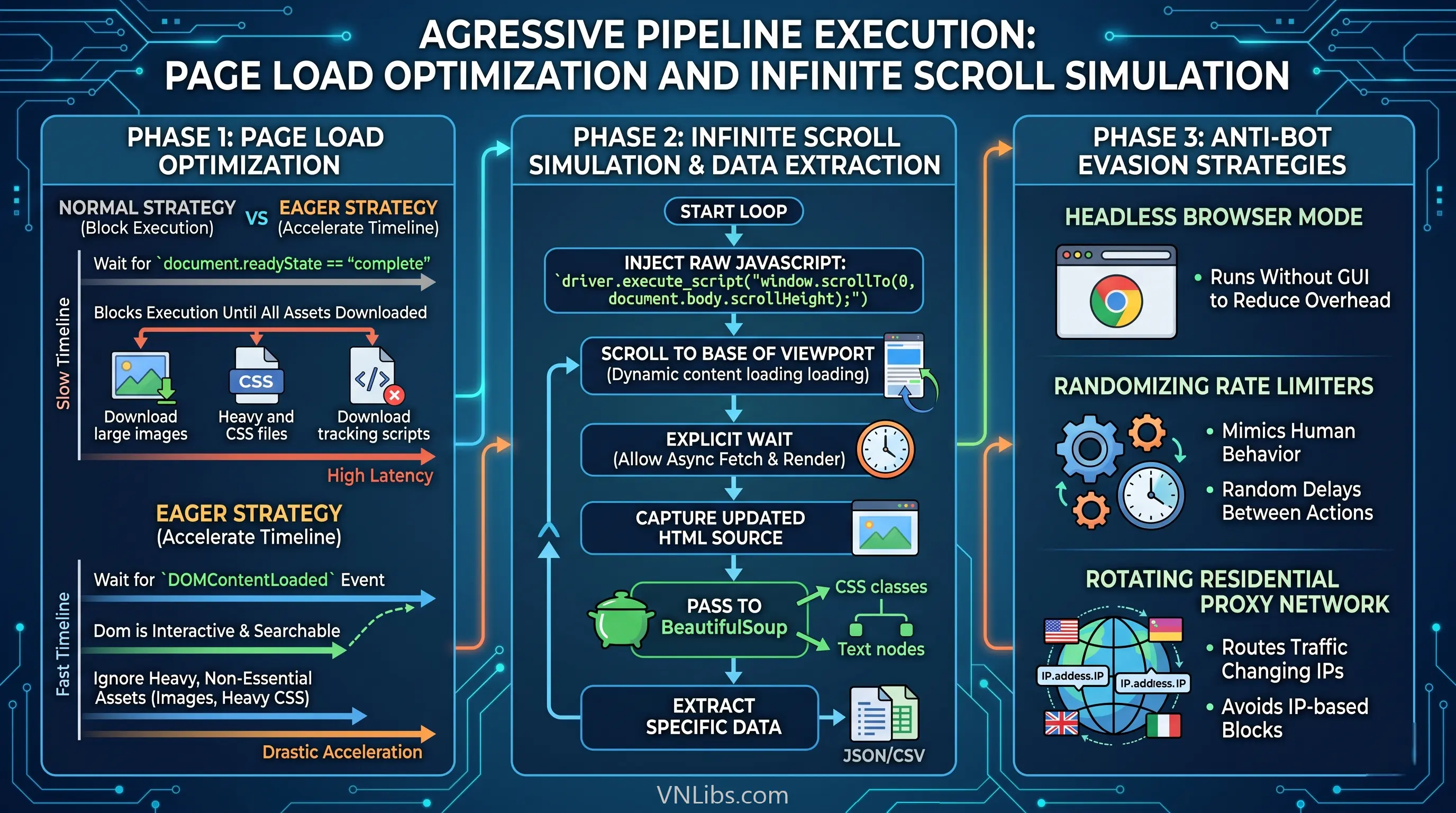
BeautifulSoup can then efficiently traverse the static HTML snapshot, isolating highly specific CSS classes and hierarchical text nodes to extract the requisite data.
Finally, to ensure continuous, uninterrupted data collection, robust extraction pipelines must integrate defensive mechanisms against anti-bot countermeasures.
This includes deploying headless browser modes (running without a graphical user interface to reduce overhead), implementing randomizing rate limiters to mimic human behavior, and routing traffic through rotating residential proxy networks to avoid IP-based blocks.
IV. Centralized Data Manipulation, Ingestion, and Aggregation.
Following the successful extraction of structured, semi-structured, or completely unstructured data from remote web sources or local file directories, the pipeline requires a centralized, high-performance computation engine for sanitization, transformation, and statistical analysis.
Within the Python ecosystem, Pandas serves as the definitive architectural standard for these operations. Pandas acts as a highly optimized abstraction layer built directly upon lower-level C code and NumPy arrays, providing execution speeds that standard Python lists and dictionaries cannot match.
The primary data structure utilized throughout this phase is the DataFrame - a two-dimensional, size-mutable, and heterogeneous tabular data matrix with labeled axes, analogous to a highly programmable SQL table or Excel spreadsheet.
IV.1. Scalable Ingestion and Memory Footprint Optimization.
Automated data pipelines frequently mandate the aggregation of highly fragmented datasets, such as consolidating hundreds of daily operational .csv files stored across deeply nested subdirectories.
Procedural iteration over these files to append them line-by-line using standard Python open() commands is computationally disastrous and scales incredibly poorly.
The optimal ingestion paradigm utilizes the glob module to dynamically generate an iterable list of file paths. This list is subsequently passed through a Python generator expression directly into the pd.concat() method.
This specific architecture dynamically instantiates and merges the disparate DataFrames directly in active memory, providing an extraordinarily scalable mechanism for consolidating fragmented data lakes without generating intermediate physical files.
Data standardization must occur at the pipeline boundary during ingestion. Utilizing read parameters such as skiprows allows the engine to autonomously bypass irrelevant header metadata or corrupted formatting at the top of legacy files.
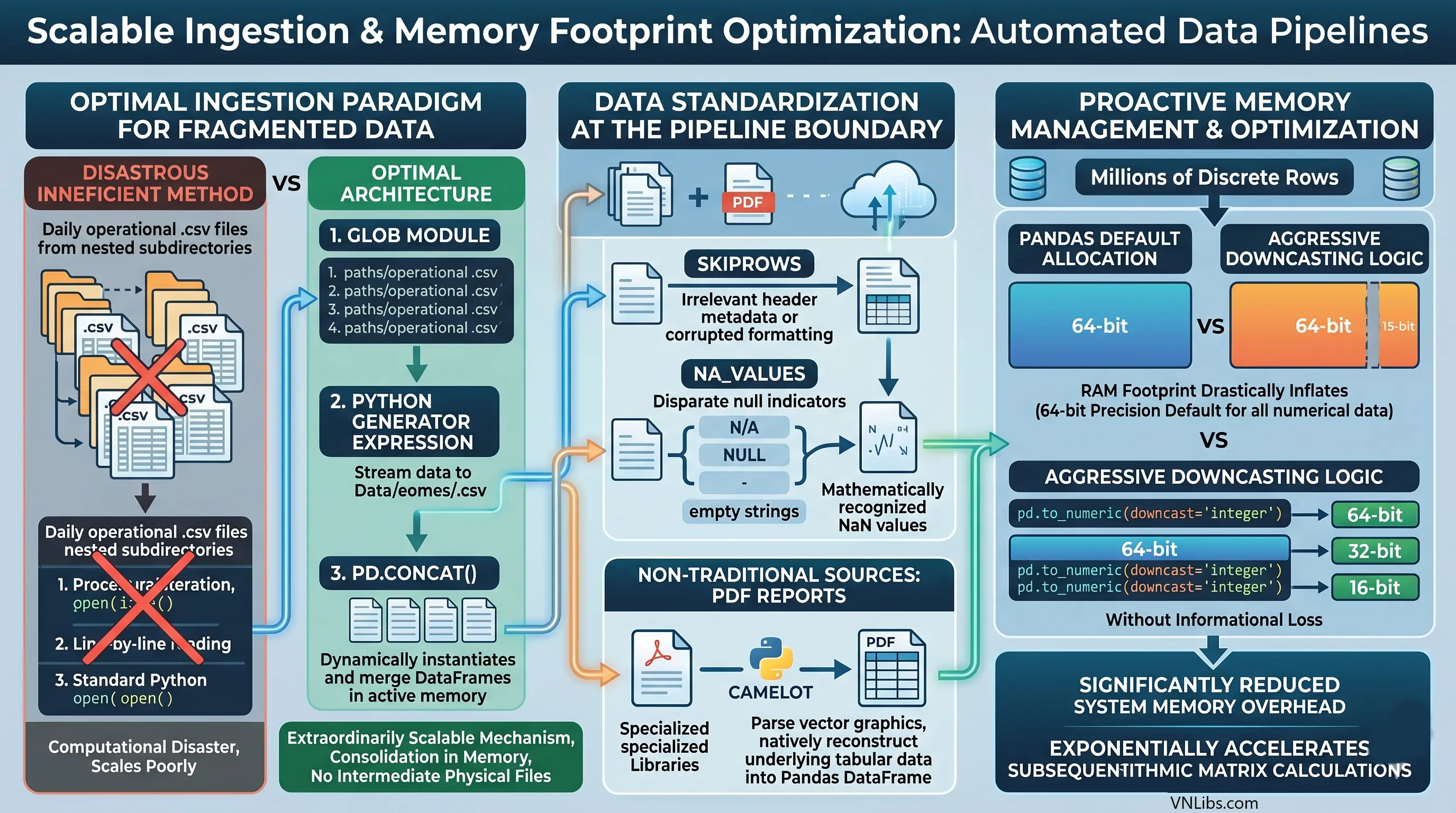
Similarly, explicitly defining na_values during the read operation ensures that disparate null indicators (e.g., "N/A", "NULL", "-", or empty strings) are globally standardized into mathematically recognized NaN values before any analytical processing begins.
Furthermore, when extracting data from non-traditional sources, such as static PDF reports, the pipeline can integrate specialized libraries like camelot to parse the vector graphics of the PDF and natively reconstruct the underlying tabular data directly into a Pandas DataFrame.
As automated pipelines scale to ingest millions of discrete rows, proactive memory management becomes a critical vector for maintaining system stability. Pandas conservatively defaults to allocating 64-bit precision blocks for all numerical data, which drastically inflates the Random Access Memory (RAM) footprint of large datasets.
Automation architectures must implement aggressive downcasting logic. By leveraging conversion functions such as pd.to_numeric(downcast='integer'), 64-bit integers can be mathematically compressed into 32-bit or even 16-bit integers without any loss of informational precision.
This optimization significantly reduces system memory overhead and exponentially accelerates subsequent algorithmic matrix calculations.
IV.2. Vectorized Transformation and Relational Algebra.
The profound structural superiority of Pandas over standard loop-based processing lies entirely in its vectorized architecture. Modifying columns, applying complex conditional logic, and mathematically transforming individual data points should never be executed via manual row-by-row iteration.
| Transformation Requirement | Procedural Approach (Anti-Pattern) | Vectorized Architecture (Standard Practice) |
|---|---|---|
| Conditional Assignment | Iterating over rows utilizing .iterrows() and applying standard Python if/else logic gates. | Utilizing numpy.where() for highly parallelized, array-level conditional evaluation, executing millions of checks instantaneously. |
| Missing Data Remediation | Manually traversing rows to identify None values and replacing them utilizing index positions. | Deploying .fillna() to globally inject default integers, or .dropna() to instantaneously purge corrupted vectors from the matrix. |
| String / Schema Manipulation | Looping through header lists to find and replace column titles. | Utilizing the .rename() method mapped to a dictionary, or applying anonymous lambda functions across the .columns index. |
| Mathematical Derivation | Executing math functions line-by-line. | Directly operating on Series objects via vectorized addition: df['new_col'] = df['col1'] + df['col2']. |
Beyond fundamental cleaning and type casting, automated pipelines depend heavily on relational algebra to synthesize intelligence.
When correlating disparate datasets - such as matching an extracted web table of real-time pricing against a localized historical inventory ledger - the pd.merge() function provides equivalent utility to relational database SQL joins (Inner, Left, Right, Outer). This allows the automation engine to structurally unify completely isolated datasets based on highly specific key intersections.
Once merged into a master analytical matrix, the data is frequently passed through .groupby() methods. This operation logically segments the DataFrame based on categorical variables, which is then paired with aggregation functions such as .mean(), .sum(), or .count() to instantly distill millions of granular, transactional data points into highly comprehensive executive summaries.
A significant architectural consideration when building these workflows is abstracting the transformation logic. Because the stereotyped automation workflow follows a strict retrieve-process-retrieve sequence, data engineers must construct these pipelines utilizing object-oriented programming principles or functional chain-of-responsibility patterns.
Abstracting the transformation logic into distinct callable classes allows data scientists to interact with the configuration of the workflow, inject customized parameters, or debug specific stages via interactive Jupyter Notebook environments without dismantling or destabilizing the underlying production automation framework.
V. Automated Generation of Serialized Analytical Reports.
The culmination of the data extraction and manipulation phases is the presentation layer. The raw numerical arrays and floating-point matrices housed within Pandas memory must be serialized into formatted, highly readable artifacts suitable for immediate stakeholder consumption.
The automated generation of these artifacts eliminates thousands of hours traditionally wasted on manual data entry, manual cell formatting, and repetitive charting. The output formats most prevalent in corporate automation environments are deeply formatted Excel workbooks and highly stylized, immutable Portable Document Formats (PDFs).
V.1. Programmatic Excel Serialization and Formatting.
While Pandas provides a native .to_excel() function built upon default engines like openpyxl, its capabilities are strictly limited to raw data serialization. It executes a rudimentary dump of the two-dimensional DataFrame matrix into a blank spreadsheet, but completely lacks the capacity for aesthetic presentation, specialized formatting, or advanced charting.
To generate production-ready financial models or visual analytical reports, the Python pipeline must explicitly declare and integrate XlsxWriter as the specific engine underlying the Pandas ExcelWriter object.
XlsxWriter is a powerful, highly specialized module dedicated solely to writing and formatting .xlsx files. By extracting the native workbook and worksheet objects directly from the instantiated Pandas writer, the automation script gains absolute programmatic control over the Excel environment.
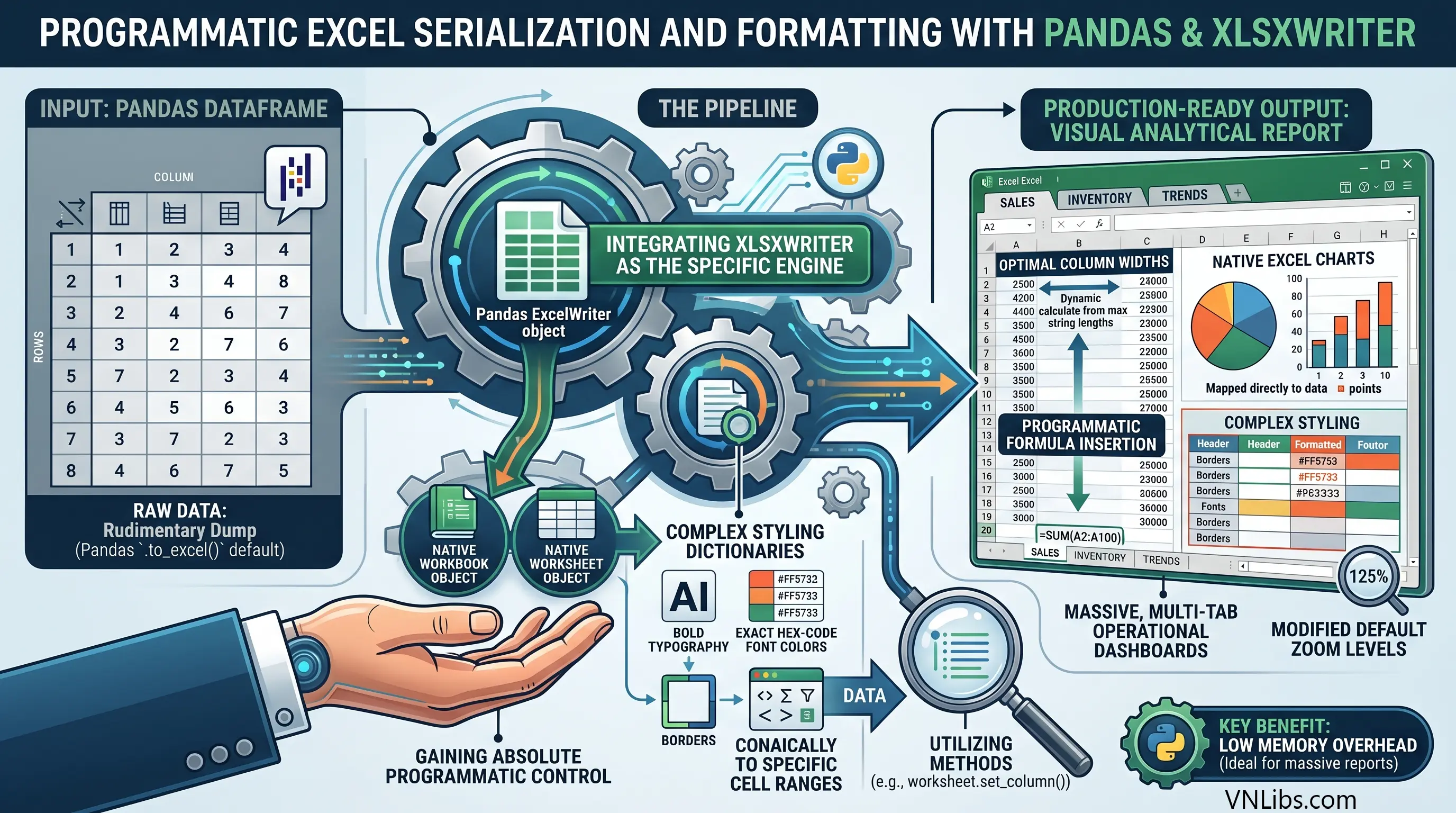
The system can define complex styling dictionaries - programmatically specifying bold typography, exact hex-code font colors, borders, and conditional formatting rules - and apply these dictionaries dynamically to specific cell ranges utilizing methods such as worksheet.set_column().
A fully realized Excel automation pipeline extends far beyond elementary cell coloring. The script can be engineered to dynamically calculate optimal column widths based on the maximum string lengths present in the DataFrame, inject sum totals via programmatic formula insertion at the absolute base of dynamic data blocks, modify the workbook's default zoom levels for better readability, and overlay native Excel charts mapped precisely to the serialized DataFrame outputs.
Because XlsxWriter operates strictly as a writer tool (it cannot read existing files), it executes these complex formatting operations with exceptionally low memory overhead, making it the ideal architectural choice for the automated generation of massive, multi-tab operational dashboards.
V.2. Constructing Immutable PDF Architectures.
For reports requiring strict immutability, high-fidelity printing, or absolute cross-device formatting consistency - such as final customer invoices, legal compliance audits, or executive market briefings - PDF generation is the required serialization vector.
The translation of Pandas DataFrames into PDFs requires bridging technologies, and the architectural selection depends entirely on the required complexity and interactive nature of the final report design.
| PDF Generation Technology | Architectural Methodology | Optimal Use Case |
|---|---|---|
| ReportLab | Generates direct binary PDF structures utilizing low-level canvas drawing APIs. | Highly complex, heavily customized reports requiring absolute pixel-perfect text placement, utilized by massive platforms like Wikipedia. |
| FPDF | A straightforward, class-based library allowing programmatic, procedural instantiation of pages, text cells, and images. | Rapid deployment of standard analytical reports containing text blocks, dynamic data tables, and imported graphical charts. |
| Pandoc / Datapane | Serializes DataFrames to intermediate HTML or Markdown structures, which are subsequently rendered to PDF. | Scenarios where front-end web developers handle the HTML/CSS styling layer, allowing Python to act solely as the backend data injection mechanism. |
While ReportLab offers unparalleled precision, the rapid deployment cycles of modern data pipelines often favor the class-based simplicity of FPDF or the web-centric flexibility of Datapane.
When utilizing FPDF, the reporting script generally imports graphing libraries such as Matplotlib or Plotly to render visual representations of the underlying statistical data.
The automation logic structures the Pandas DataFrame, passes the vectors to the plotting library to generate and save an image file (e.g., a .png bar chart), instantiates the FPDF document object, and configures the typography.
The script then iterates over the DataFrame to dynamically draw physical table borders and inject text strings cell-by-cell, and finally embeds the saved chart image directly into the specified coordinates of the document canvas. The resulting artifact is a comprehensive, multi-page analytical dossier generated entirely via algorithmic logic.
VI. Seamless Distribution and Notification Systems.
An automation pipeline is only fully realized when the generated analytical artifacts are successfully delivered to end-users and stakeholders.
Electronic mail remains the ubiquitous protocol for organizational communication, and Python facilitates extensive network-level interactions via the smtplib and email standard libraries.
Programmatic email dispatch involves far more architectural complexity than simple text transmission; it requires the precise construction of multipart message objects and the highly secure negotiation of internet mail server connections.
VI.1. Constructing MIME Multipart Payloads.
Electronic mail transmission standards dictate that messages containing complex formatting, HTML elements, or file attachments must be serialized into Multipurpose Internet Mail Extensions (MIME) formats.
To dispatch a generated report alongside an HTML-formatted message body, the automation script initializes a MIMEMultipart object. This object serves as the master outer envelope, strictly mapping critical routing headers such as the "Subject," "From," and "To" fields, as well as the chronological date stamp.
The message body - whether plain text or rich HTML - is instantiated using MIMEText and appended sequentially to the multipart envelope. One highly efficient reporting technique involves bypassing file attachments entirely for rapid intelligence dissemination.
The script converts a summarized Pandas DataFrame directly to an HTML table string using the .to_html() method and injects it into the MIMEText object. This provides recipients with an immediate visual summary rendered directly within the email body.
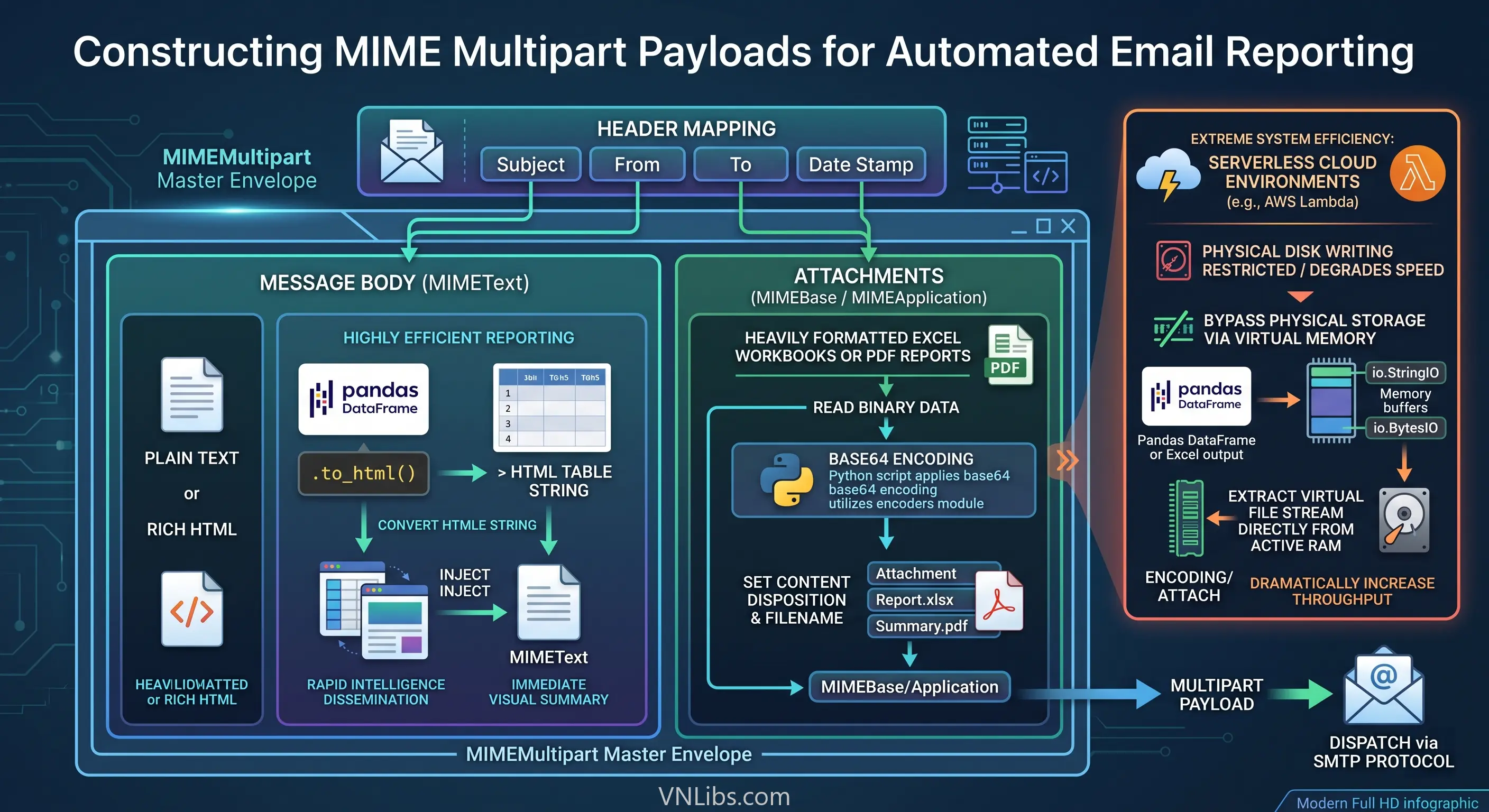
For attaching the heavily formatted Excel workbooks or generated PDF reports, the system reads the binary data of the file and instantiates a MIMEBase or MIMEApplication object. Because SMTP systems operate strictly over text-based internet protocols, binary data must be systematically encoded.
The Python script applies base64 encoding to the payload utilizing the encoders module, sets the specific content disposition headers declaring the payload as a downloadable attachment, assigns the appropriate filename string, and attaches it to the master MIME object.
To achieve extreme system efficiency, especially within serverless cloud-based automation environments (such as AWS Lambda) where physical disk writing is severely restricted or degrades execution speed, the pipeline can bypass physical file storage entirely.
By serializing the Pandas DataFrame or Excel output into a virtual memory buffer utilizing io.StringIO or io.BytesIO, the script extracts the virtual file stream directly from the active RAM memory block.
It then attaches this virtual stream to the email payload without ever interacting with the host machine's physical hard drive, dramatically increasing pipeline throughput.
VI.2. Securing the SMTP Handshake.
Transmission security is absolutely paramount when automating the dissemination of proprietary corporate data. Once the complex MIME payload is serialized into a string format, the script establishes a connection to the designated SMTP server (e.g., smtp.gmail.com).
Legacy systems might utilize port 587 and initiate a starttls() command to upgrade an initially insecure connection. However, modern architectural standards and strict security policies demand the utilization of port 465, which establishes implicit SSL encryption from the exact moment of connection.
The code generates a strict security perimeter utilizing the ssl module, specifically invoking the ssl.create_default_context() method. This critical architectural step actively loads the host operating system's trusted Certificate Authority (CA) chains, forces stringent hostname verification against the mail server, and strictly disables deprecated, insecure cryptographic ciphers.
The smtplib.SMTP_SSL client wraps the socket connection in this highly secure context, negotiates the cryptographic handshake, authenticates utilizing secure application-specific passwords (often masked from the terminal via the getpass module), dispatches the encoded byte stream via the sendmail command, and gracefully terminates the session.
VII. Advanced Orchestration, Scheduling, and Administrative Automation.
The final architectural layer in building fully realized Python automation pipelines is the complete detachment of the scripts from manual human triggers. An autonomous system must execute highly complex workflows continuously, reliably, and on precise temporal schedules without any supervision.
Furthermore, the programmatic principles applied to data ingestion and file manipulation can be broadly abstracted to encompass deep administrative system maintenance.
VII.1. Execution Scheduling Environments.
Establishing temporal triggers for automated pipelines depends heavily on the host operating environment and the required granularity of execution control.
- Operating System Level Orchestration: For server-side pipeline deployments running on Linux architectures, execution is typically delegated to the operating system's highly robust cron daemon. The Python automation script is encapsulated within a bash wrapper (.sh file) that manages environmental variables, handles virtual directory navigation, and explicitly invokes the correct Python 3 interpreter. The system cron table is then configured to execute the bash script at highly specific intervals. This architecture completely separates the scheduling logic from the application codebase, ensuring high reliability; if the Python application suffers a fatal fault, the operating system will still unconditionally attempt to execute the next scheduled run.
- Application Level Orchestration: For persistent Python applications, or highly complex interdependent workflows running within a single daemon, modules such as APScheduler are deployed. This library implements background schedulers capable of triggering target functions utilizing exact cron-like syntax, continuous interval timers, or specific future date stamps. APScheduler allows automation engineers to define complex, stateful pipelines entirely within the Python context. The script initializes a BackgroundScheduler, maps specific execution logic via the CronTrigger class (e.g., executing an extraction sequence exactly at 02:00 AM daily), and leverages the logging module to maintain a continuous, timestamped log of successful job completions and fault states.
These scheduling mechanisms are what enable the construction of true end-to-end machine learning and data science automation pipelines. A singular scheduled job can autonomously trigger a web scraping sequence, pass the payload to Pandas for sanitization, utilize ydata-profiling to generate automated exploratory data analysis (EDA) reports, execute feature engineering via Feature-engine, train predictive models using Scikit-learn pipelines, and evaluate the outputs utilizing Yellowbrick, all before emailing the final intelligence dossier.
VII.2. Advanced Administrative Integrations and Optical Character Recognition.
The automation design patterns utilized for big data pipelines are frequently extrapolated into dedicated administrative system tools. GitHub repositories dedicated to automation scripting regularly feature Python daemons designed for continuous system oversight.
These specialized administrative architectures include modules designed to perpetually monitor available network bandwidth (TestMyInternetSpeed), trigger automated alerts upon severe battery degradation, map and dynamically lock restricted local directories for security purposes, verify continuous public IP addressing, and execute automated ping sweeps across critical infrastructure servers to aggressively monitor network uptime.
A highly advanced subset of administrative automation involves the programmatic distillation of unparseable, physical documents via Optical Character Recognition (OCR).
In corporate and legal environments inundated with scanned paperwork, physical receipts, or image-based PDFs, standard text extraction libraries completely fail because the text is locked within a vector graphic or pixel matrix. To automate the ingestion of these artifacts, the pipeline requires a multi-stage computer vision architecture.
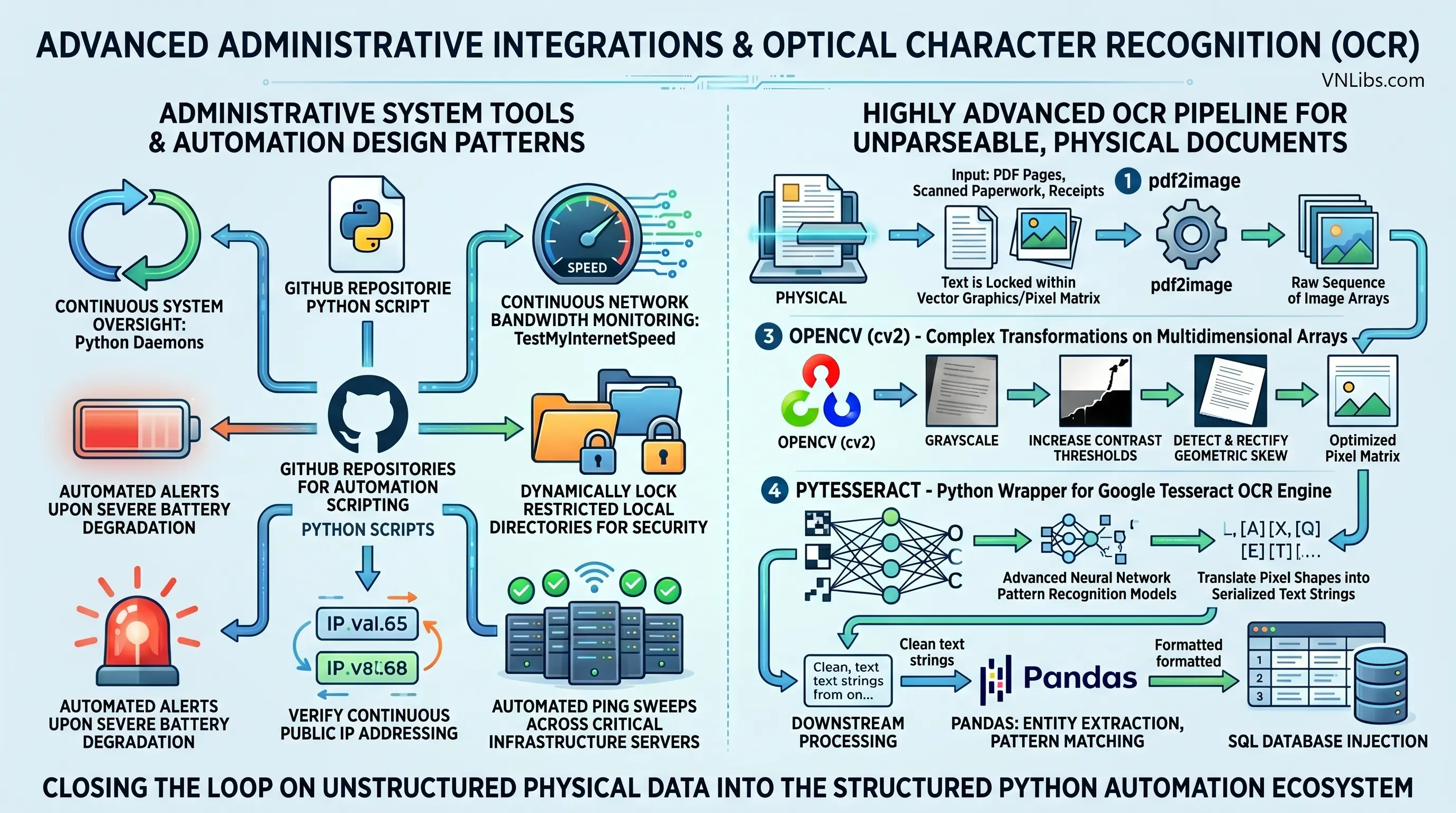
The automation system first utilizes the pdf2image library to convert the binary PDF pages into a raw sequence of image arrays. These multidimensional arrays are subsequently fed into OpenCV (cv2).
OpenCV executes complex mathematical transformations to convert the image to grayscale, dramatically increase contrast thresholds, and critically, algorithmically detect and rectify geometric skew caused by flawed physical document scanning.
Once the pixel matrix is mathematically optimized and deskewed, it is passed directly through pytesseract, a specialized Python wrapper for the Google Tesseract OCR engine. Tesseract deploys advanced neural network pattern recognition models to physically translate the pixel shapes into serialized text strings.
These extracted strings are then passed downstream to Pandas for entity extraction, pattern matching, and SQL database injection. This advanced capability closes the loop on unstructured, physical data, forcing highly disparate, non-machine-readable formats into the highly structured, deterministic logic gates of the Python automation ecosystem.
VIII. Synthesizing the Automation Framework.
The systematic deployment of Python-driven automated workflows represents a fundamental, necessary transition from manual, error-prone data operations to highly robust, algorithmic system administration.
The true power of Python automation is not found in isolated scripting, but in the seamless architectural integration of specialized modules to create continuous, autonomous data pipelines.
By abstracting fragile, string-based local directory interactions via the object-oriented pathlib module, system operations become resilient to cross-platform deployment errors and race conditions.
Navigating complex, dynamically rendered asynchronous DOM environments requires abandoning static HTTP parsers in favor of Selenium WebDrivers, guided by precise, explicitly defined explicit waits that perfectly mimic human interaction.
Once data is ingested, abandoning slow, procedural loops in favor of centralizing data transformation within the vectorized, memory-optimized matrices of Pandas allows organizations to architect pipelines capable of extreme computational throughput.
The subsequent serialization of this processed intelligence into highly formatted, programmatic Excel workbooks via XlsxWriter, or immutable PDF artifacts utilizing libraries like FPDF, guarantees that the final outputs are highly professional and immediately actionable.
When combined with the secure, MIME-encoded distribution over SSL-encrypted SMTP channels, critical intelligence flows entirely uninterrupted from the raw, unstructured data source to the final stakeholder.
Finally, binding these discrete modules together through robust orchestration logic - whether via OS-level cron daemons or application-level schedulers like APScheduler - and augmenting them with advanced capabilities like Tesseract OCR and continuous network monitoring, results in an architecture that eliminates the vast majority of operational friction.
The systemic adoption and continuous engineering of these Python automation principles constitute the critical structural foundation required for scaling and securing modern organizational data operations.

Senior Software Architect & Open‑Source Maintainer
Dr. Marcus Hale holds a PhD in Computer Science from Carnegie Mellon University. He specializes in curating secure, production‑ready code snippets and software architecture best practices.